
If you’re an Amazon shopper, you’ve probably noticed that your order history stays visible in your account for a long time. While this feature is useful for tracking past purchases, sometimes you may want to remove or hide your Amazon order history. Whether it’s for privacy, surprise gift planning, or simply organizing your account, knowing how to delete or hide your order history is important. This guide explains everything you need to know in simple, easy-to-follow steps.
Before we dive into the steps, let’s talk about why someone might want to remove their Amazon order history:
Privacy Concerns: Your order history can reveal personal shopping habits and preferences. Deleting it helps protect your data, especially if you share your Amazon account with family or friends.
Surprise Gifts: If you’re buying a gift for someone who also uses your Amazon account, hiding your purchase history keeps the surprise intact.
Account Organization: Over time, your order list can get cluttered. Removing old orders makes it easier to find recent purchases and manage your account.
Security: If you’re worried about someone accessing your account, clearing your history adds an extra layer of security.
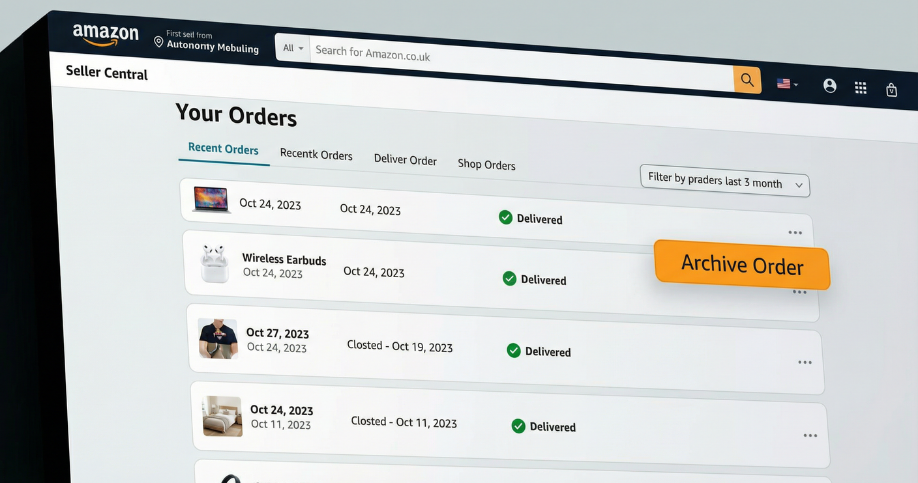
Amazon does not allow users to permanently delete their order history. However, you can archive or hide orders so they don’t appear in your visible order list. This is the closest you can get to “deleting” your order history on Amazon.
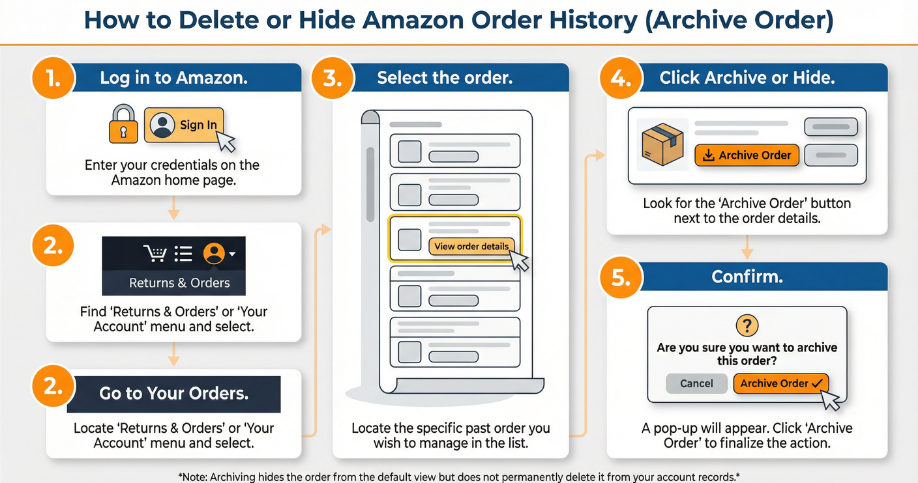
Follow these simple steps to hide or archive your Amazon order history:
Sign In to Your Amazon Account
Open the Amazon website and log in using your email and password.
Go to Your Orders
Click on “Account & Lists” at the top right corner of the page. From the dropdown menu, select “Your Orders.”
Find the Order You Want to Hide
Scroll through your order list to find the purchase you want to remove from view. You can use filters to narrow down your search by date or order status.
Archive or Hide the Order
Next to the order, you’ll see options like “Archive Order” or “Hide Order.” Click on this option and confirm your choice.
Once archived, the order will no longer appear in your main order list. It will be moved to a separate section for archived orders.
Double-Check Your Changes
Go back to your order history and make sure the selected order is no longer visible. If you want to restore it later, you can unarchive it from the archived orders section.
If you’re looking for how to delete purchase history on Amazon, the process is the same as above. Amazon does not allow you to permanently erase your purchase history, but archiving orders hides them from your main view. This is the best way to “delete” your Amazon purchase history.
Archive Orders Regularly: If you want to keep your account organized, make it a habit to archive old orders every few months.
Use Incognito Mode: When shopping for gifts or sensitive items, use your browser’s private or incognito mode. This prevents your purchases from appearing in your regular order history.
Clear Browser History: For added privacy, clear your browser’s cookies and cache after archiving orders. This ensures no trace of your activity remains on your device.

Amazon keeps your order history for important reasons, such as tracking your purchases, managing returns, and handling customer service requests. Archiving orders is a compromise that keeps your account organized while still allowing Amazon to access your purchase data if needed.
Use Separate Accounts: If privacy is a major concern, consider creating a separate Amazon account for sensitive purchases.
Monitor Account Activity: Regularly check your account for any suspicious activity and enable two-factor authentication for added security.
By following these steps, you can easily manage your Amazon order history and keep your shopping habits private. Whether you want to delete order history from Amazon, remove an order from your history, or simply clear your purchase history, archiving is the best option available. For more tips on managing your Amazon account and optimizing your online selling experience, Seller Center is here to help.
Seller Center is a leading eCommerce solutions provider, helping sellers grow on Amazon, Flipkart, and Shopify. From Amazon account management services to Flipkart seller support, we offer expert guidance in product listing, advertising, and sales optimization. Our team ensures seamless operations, enabling brands to scale with ease.
Subscribe to Our Newsletter | Stay Updated with E-commerce Insights