
Everyone asks the same question sooner or later: “How much can we earn from YouTube?” The honest answer is: it depends. But there’s also a practical answer: you can estimate your income pretty quickly if you understand two things—views and CPM.
That’s exactly why a simple YouTuber Earnings Calculator is useful. It doesn’t try to predict your full business income, brand deals, or sponsorships. It only estimates ad revenue based on your daily views and an assumed CPM, then shows daily, monthly, and yearly numbers so you can plan better.

CPM means “cost per mille,” where mille means one thousand. In advertising, CPM is a rate for 1,000 impressions (or 1,000 ad views), and many calculators use it as a quick way to estimate revenue per 1,000 views.
On YouTube, CPM and related metrics show up in analytics to help creators understand ad performance. The important thing: CPM is not guaranteed, and not every single view shows an ad, so a calculator should be treated as an estimate, not an exact salary.
This is where many people get confused. They search “earnings per 1000 views youtube” and expect one fixed number. In reality, CPM changes based on multiple factors, such as:
Video topic (some niches attract higher-paying advertisers).
Audience behavior (watch time, engagement, returning viewers).
Season (CPM often changes during big sale seasons or year-end ad spend cycles).
Advertiser demand for your audience type.
That’s why calculators ask you to enter your own CPM (or a CPM range), instead of claiming a single “YouTube pays X amount” promise.
Your competitor tool is simple: it takes daily views and a CPM rate and then calculates earnings. That’s the right approach if your goal is speed and clarity.
Here’s the formula your blog should show in plain language:
Daily Earnings = (Daily Views ÷ 1000) × CPM
Monthly Earnings = Daily Earnings × 30
Yearly Earnings = Daily Earnings × 365
This matches the typical CPM logic used across ad revenue estimation tools.
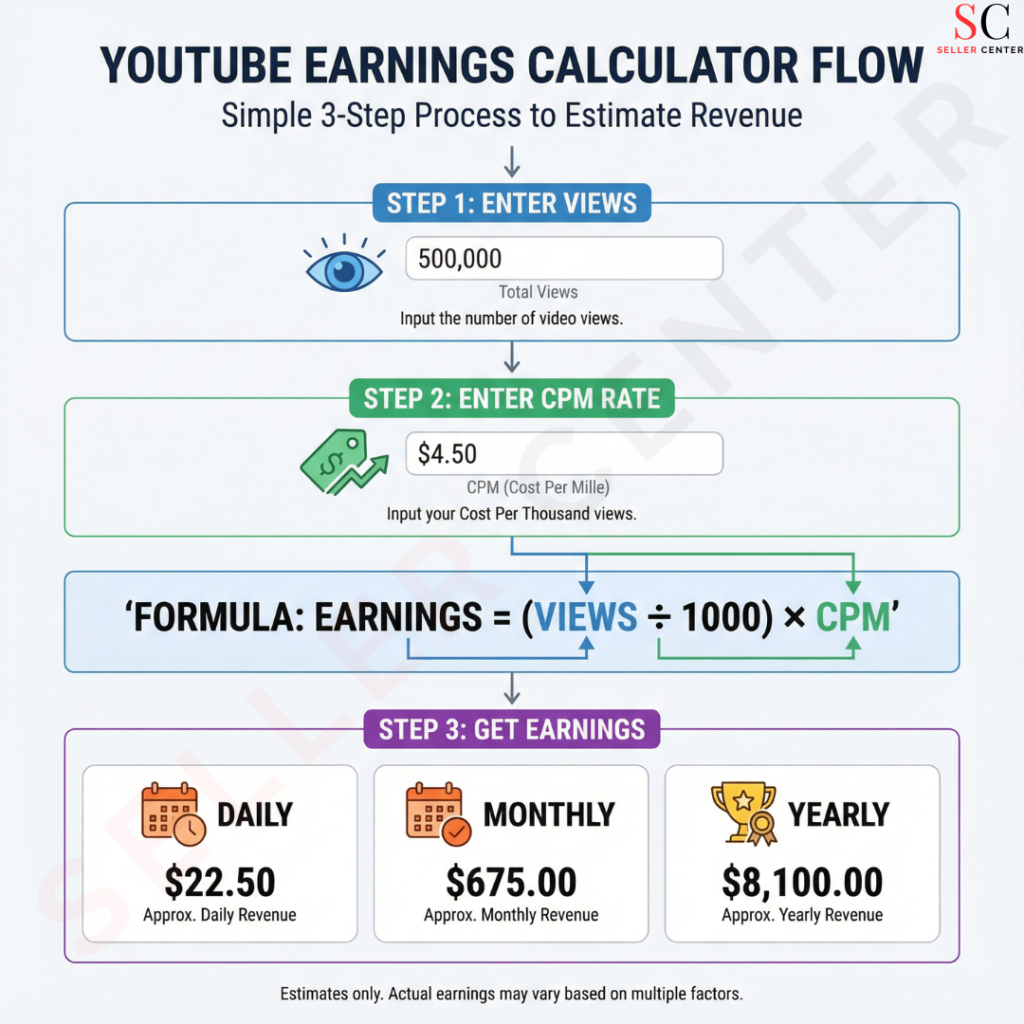
Let’s say a channel gets 50,000 views per day. If the assumed CPM is $2:
Daily = (50,000 ÷ 1000) × 2 = $100/day
Monthly ≈ $3,000/month
Yearly ≈ $36,500/year
This example makes the tool instantly understandable, even for beginners who have never heard of CPM before
A chart helps readers who don’t want to calculate manually. You can add a small table like this (use it inside your blog near the calculator):
Assuming CPM = $1, $3, $5
1,000 views/day → $1 / $3 / $5 per day
10,000 views/day → $10 / $30 / $50 per day
100,000 views/day → $100 / $300 / $500 per day
1,000,000 views/day → $1,000 / $3,000 / $5,000 per day
This is only a reference chart; real CPM can be lower or higher depending on content and audience.

If your audience is mostly in India, CPM can look different compared to channels with large Tier‑1 audiences. But even inside India, CPM varies a lot by niche (finance vs entertainment), video length, and advertiser demand. So instead of promising “YouTube salary in India is fixed,” the best approach is: test a few CPM values in the calculator and see your likely range.
A practical tip that helps: start with a conservative CPM (like $0.5–$2) and then test a higher CPM range once you see real analytics coming in. This is exactly how experienced creators plan targets without getting disappointed
Enter your daily views (use last 28 days average if you want a stable estimate).
Enter your Rate/CPM (from your analytics if you have it; otherwise start with a reasonable estimate).
Click Calculate Earnings.
Read your Daily, Monthly, and Yearly estimates and adjust CPM to see best/worst cases.
How much does YouTube pay for 1,000 views?
Is CPM the same as my earnings?
Can I calculate monthly income from YouTube?
Seller Center is a leading eCommerce solutions provider, helping sellers grow on Amazon, Flipkart, and Shopify. From Amazon account management services to Flipkart seller support, we offer expert guidance in product listing, advertising, and sales optimization. Our team ensures seamless operations, enabling brands to scale with ease.
Subscribe to Our Newsletter | Stay Updated with E-commerce Insights