Amazon Brand Registry

If you sell products on Amazon under your own brand name, you’ve probably come across something called Brand Registry. Maybe you’ve ignored it thinking it’s too complicated, or maybe you’re not sure what it even does. Either way, let me walk you through this in the simplest way possible.

Step 1: Understanding What Brand Registry Actually Is

Brand Registry is Amazon’s way of confirming you’re the real owner of your brand. That’s it. Once Amazon knows you own the brand, they give you special tools to protect your listings and grow your business.

Think about it like this: without Brand Registry, anyone can mess with your product listings. They can change your photos, rewrite your descriptions, or even sell knockoffs under your brand name. With Brand Registry, you become the boss of your listings.

Step 2: Know Why This Matters for Your Business

Before you jump into registering, understand what you’re actually getting. Here are the real benefits:
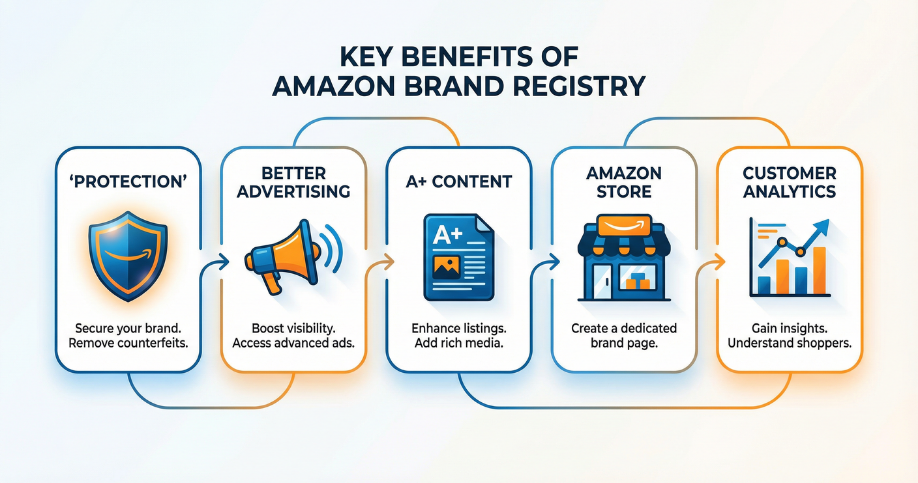
Protection from fake sellers and hijackers

  • You get tools to report and remove unauthorized sellers from your listings. No more watching someone sell cheap knockoffs under your brand name.

Better advertising options

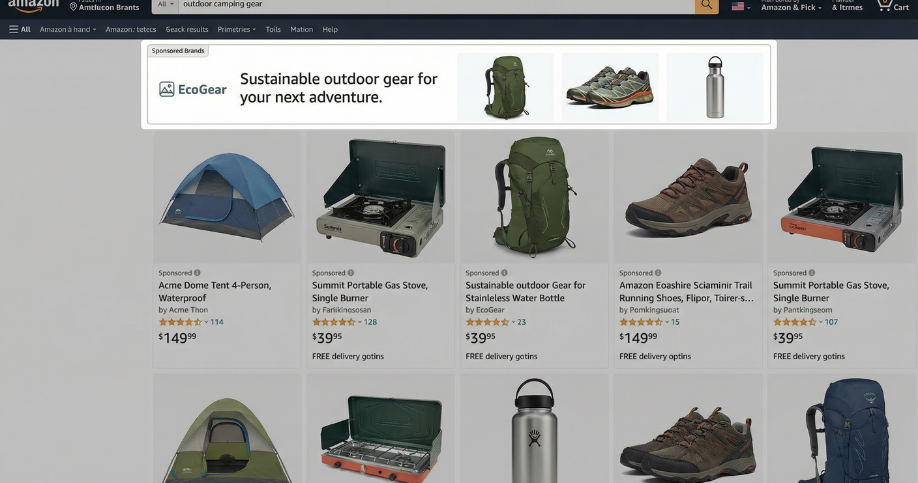
  • Regular sellers only get basic ads. Brand Registry unlocks Sponsored Brands—those big banner ads at the top of search results with your logo and multiple products.

Professional-looking product pages

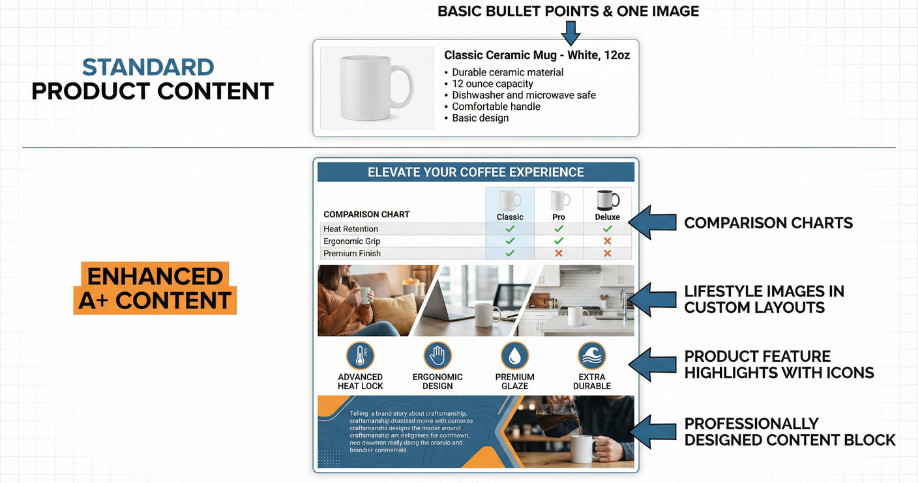
  • A+ Content lets you add fancy images, comparison charts, and detailed product stories to your listings. This makes your pages look legitimate and trustworthy.

Your own storefront

  • You can build an Amazon Store—like having your own little website inside Amazon where customers can browse all your products.

Customer insights

  • Brand Analytics shows you what people search for, which products they compare, and what actually makes them buy. This data is gold for planning your next products.
Brand Registry Benefits Overview

Step 3: Check If You Qualify

Not everyone can register their brand. Amazon has specific requirements:

You need a registered trademark

  • This is non-negotiable. You can’t use just a business name or a logo you created. It has to be an official trademark registered with your country’s trademark office.

You need a professional seller account

  • Individual seller accounts won’t work. You’ll need to upgrade to a professional account first.

You should be the actual brand owner

  • If you’re just reselling someone else’s products, this program isn’t for you. Brand Registry is only for people who own the brand rights.

Step 4: Get Your Trademark Sorted Out

This is the part that stops most people. Getting a trademark takes time and money, but it’s necessary. Here’s what you need to do:
Apply for a trademark in your country

  • In India, you apply through the Indian Trademark Registry. In the US, it’s the USPTO. Other countries have their own systems.

Wait for approval

  • Trademark approval can take several months. Sometimes up to a year depending on your country. Yes, it’s slow, but worth it.

Get your registration number

  • Once approved, you’ll receive a trademark registration number. Keep this handy—Amazon will ask for it.
Trademark Registration Process

Step 5: Prepare Your Application Materials

Before you start the application, gather everything you’ll need:
Your trademark registration number

  • Have your official trademark number ready. Pending applications usually don’t work unless you’re using Amazon’s IP Accelerator program.

Clear photos of your branding

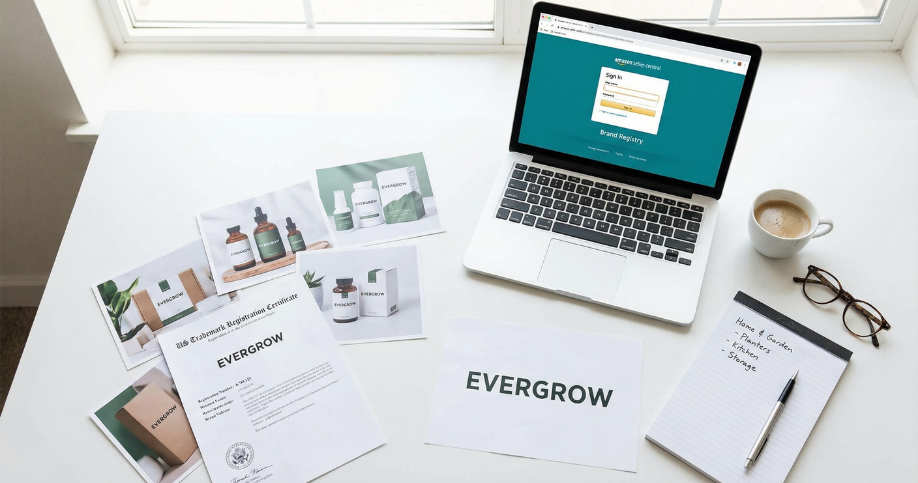
  • Take good quality photos showing your brand name or logo on your actual products or packaging. Amazon wants to see that you’re really using this trademark.

Your brand logo

  • Have a clean digital version of your logo ready to upload.

Product category information

  • Know which product categories your brand covers
Application Materials Checklist

Step 6: Submit Your Application

Now for the actual registration process:

Log into Seller Central

  • Go to your Amazon Seller Central dashboard.

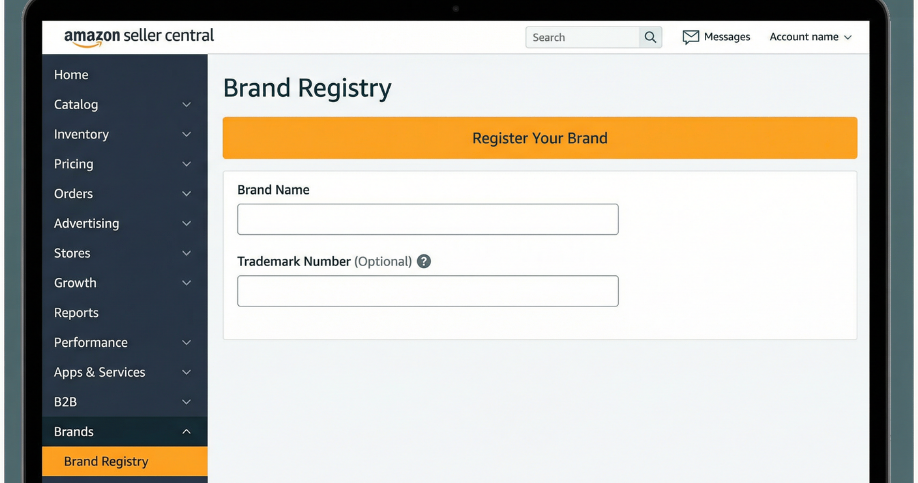
Find Brand Registry

  • Look for the Brand Registry section. It’s usually under the “Brands” menu or you can search for it.

Fill out the form

  • Enter your brand name exactly as it appears on your trademark. Enter your trademark number, upload your logo, and add your product categories.

Upload your photos

  • Submit the photos showing your brand name or logo on your products or packaging.

Submit and wait

  • Hit submit and wait for Amazon to review everything. This usually takes a few days if everything matches up correctly.

Step 7: What Happens After Approval

Once Amazon approves your application, you’ll get access to all the Brand Registry tools:
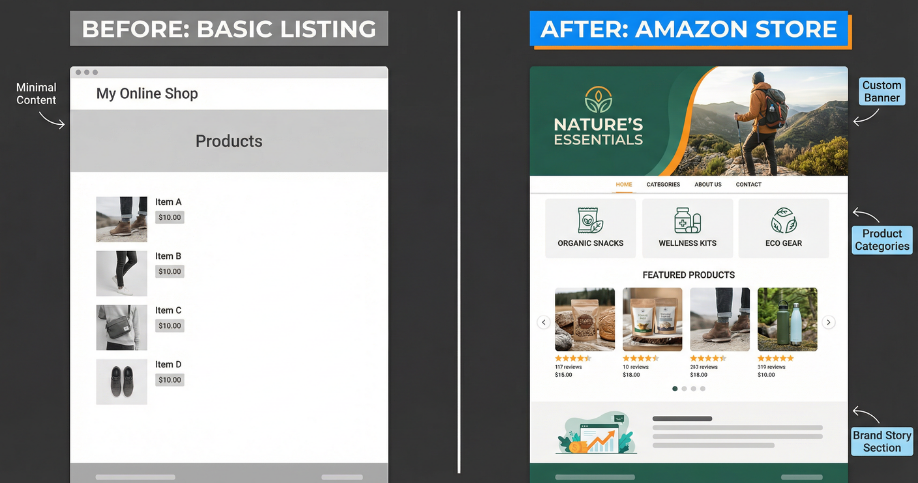
Set up your Amazon Store

  • Build your brand’s mini-website on Amazon. Add pages for different product categories, feature your bestsellers, and tell your brand story.

Create A+ Content

  • Start adding enhanced content to your product pages. Use high-quality images, comparison charts, and detailed descriptions.

Launch Sponsored Brands campaigns

  • Run those banner ads that show your logo and multiple products at the top of search results.

Check out Brand Analytics

  • Dive into the data and see what customers are searching for in your category.

Monitor your listings

  • Keep an eye out for unauthorized sellers and use the reporting tools to remove them.
Amazon Store Builder
A+ Content Example

Step 8: Avoid Common Mistakes

Here are mistakes I’ve seen sellers make:

Not matching brand names exactly

  • If your trademark says “ABC Products” but your packaging says “ABC,” Amazon might reject you. Everything needs to match perfectly.

Using poor quality photos

  • Blurry photos or images where the brand name isn’t clearly visible will get rejected. Use good lighting and clear shots.

Forgetting to use the tools

  • Don’t just register and forget about it. Actually use the Store builder, A+ Content, and analytics. That’s where the real value is.

Step 9: Maintain Your Registration

Brand Registry isn’t a one-time thing:

Keep your trademark active

  • Make sure you renew your trademark when it’s due. If your trademark expires, you’ll lose access to Brand Registry.

Update your information

  • If you change your brand logo or add new product categories, update your Brand Registry information.

Stay active

  • Amazon might review registered brands periodically. Make sure you’re still actively selling and using your trademark.

Final Thoughts

Brand Registry takes some effort upfront, especially getting that trademark. But once you’re in, the protection and tools you get are absolutely worth it. You’ll have better control over your listings, access to powerful marketing features, and protection from people trying to ride on your brand’s success.

Start by checking if you have a trademark. If not, apply for one now. While you’re waiting for approval, get your product photos ready and make sure your listings are solid. Once your trademark comes through, register your brand and start using all those tools Amazon gives you.


Your brand deserves that protection, and your business deserves those growth tools.

Ready to Register Your Brand on Amazon? Let Seller Center Help You

If your brand isn’t registered on Amazon yet and you’re planning to sell or already selling on the platform, now is the time to take action. Brand Registry isn’t just optional—it’s essential for protecting your products, accessing powerful marketing tools, and building long-term success on Amazon.

Don’t let the trademark process or application paperwork hold you back. At Seller Center, we specialize in helping brand owners navigate the entire Brand Registry process from start to finish. Whether you need guidance on trademark registration, help with your Brand Registry application, or advice on using all the tools once you’re approved, we’re here to support you every step of the way.

Why Choose Seller Center?

  • Expert Guidance: We’ve helped hundreds of brands successfully register on Amazon and unlock the full potential of Brand Registry.

  • Complete Support: From trademark documentation to application submission, we handle the technical details so you can focus on growing your business.

  • Local Expertise: Based in Bangalore, we understand the Indian market and work with sellers across India and beyond.

  • End-to-End Solutions: Beyond Brand Registry, we offer Amazon account management, listing optimization, advertising, and more

Get Started Today

Fill out the form below and our team will contact you within 24 hours to discuss your Brand Registry needs. We’ll review your current situation, explain the requirements, and create a customized plan to get your brand registered quickly and correctly.

Fill out the form below and our team will contact you within 24 hours to discuss your Brand Registry needs. We’ll review your current situation, explain the requirements, and create a customized plan to get your brand registered quickly and correctly.

    Seller Center
    1st Floor, 205/A, 55th Cross Road
    Opposite ABC Park, 4th Block, Rajajinagar
    Bengaluru, Karnataka 560010

    Call us: 07406513246
    Websitewww.sellercenter.in

    Don’t wait until counterfeiters attack your listings or competitors steal your market share. Protect your brand and unlock Amazon’s most powerful tools today. Let Seller Center guide you through the Brand Registry process and set your business up for long-term success on Amazon.